
Bringing Daily Diabetes Care into One Screen - Diablyst's First Home Screen Blueprint
#diablystPublished: 07 Oct, 2025
The First Mobile Blueprint for Diablyst 📱
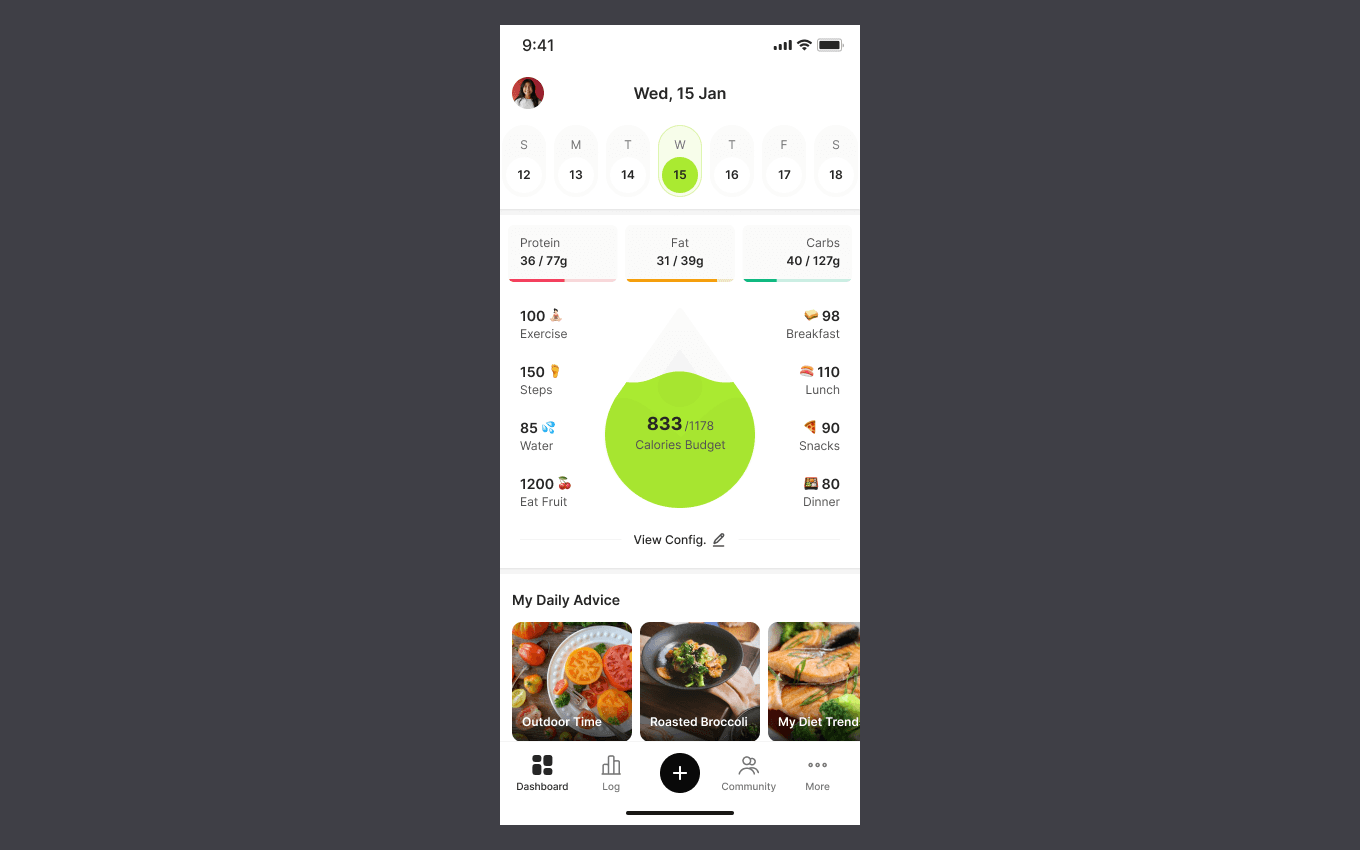
After laying the groundwork with the website and community experience, we’ve started shaping the Diablyst mobile application. The first milestone in this phase is the home screen blueprint—a single view designed to surface the most important daily metrics, actions, and insights for someone living with diabetes. This screen is not meant to do everything. Instead, it is meant to answer one simple question every day: “How am I doing today?” 🌱
This update walks through the thinking behind the home screen layout, the metrics we chose to surface first, and how navigation and inputs are intentionally designed to stay lightweight.
Why the Home Screen Comes First 🧭
In any health-related app, the home screen carries disproportionate responsibility. It is the most frequently visited surface and often the only one a user sees on busy or stressful days. For Diablyst, the home screen needed to:
- Summarize the day at a glance
- Reduce cognitive load
- Encourage healthy actions without pressure
- Stay usable even with partial data
Rather than building feature-first screens, we started with a daily-life-first mindset. The home screen is designed as a status board, not a report.
A Daily Rhythm, Not a Static Dashboard 🗓️
At the top of the screen, the date selector introduces a sense of rhythm. Users can quickly move between days without feeling like they’re digging through history. This subtle design choice reinforces an important idea: diabetes management happens daily, not occasionally. At the same time, it avoids overwhelming users with long timelines or charts when all they want is today’s context. The interface gently balances continuity and focus—acknowledging the past while keeping attention on the present.
Key Metrics, Carefully Chosen 📊
One of the biggest design challenges was deciding what not to show. Instead of flooding the screen with every possible data point, the first blueprint focuses on a small set of high-signal metrics that most users care about daily. These include macronutrient intake, calorie budget, movement, hydration, and meals. Each metric is:
- Easy to read at a glance
- Visually distinct but consistent
- Positioned to feel informative, not judgmental
The calorie budget visualization sits at the center, acting as a unifying summary rather than a strict goal meter. It’s meant to guide, not police.
Inputs/Logging That Feel Manageable ✍️
Logging is often the biggest friction point in health apps. Too many required inputs can quickly turn a useful tool into a burden. In this blueprint, inputs like meals, snacks, exercise, steps, water, and fruit intake are represented as quick-access actions. They are visible, but not demanding. The idea is simple:
- Logging should feel optional, not mandatory
- Partial data is better than no data
- Consistency matters more than perfection
By keeping inputs/logging lightweight, the app respects real-life variability.
Visual Balance and Emotional Tone 🎨
The visual language of the home screen is intentionally calm. Soft spacing, rounded components, and restrained color usage help avoid the clinical or stressful feeling common in many health apps. Color is used sparingly and meaningfully—primarily to indicate progress or highlight focus areas. There are no harsh warnings or alarming indicators in this first blueprint. This matters because emotional fatigue is real. A dashboard that feels heavy will not be opened daily.
Navigation That Stays Out of the Way 🧭
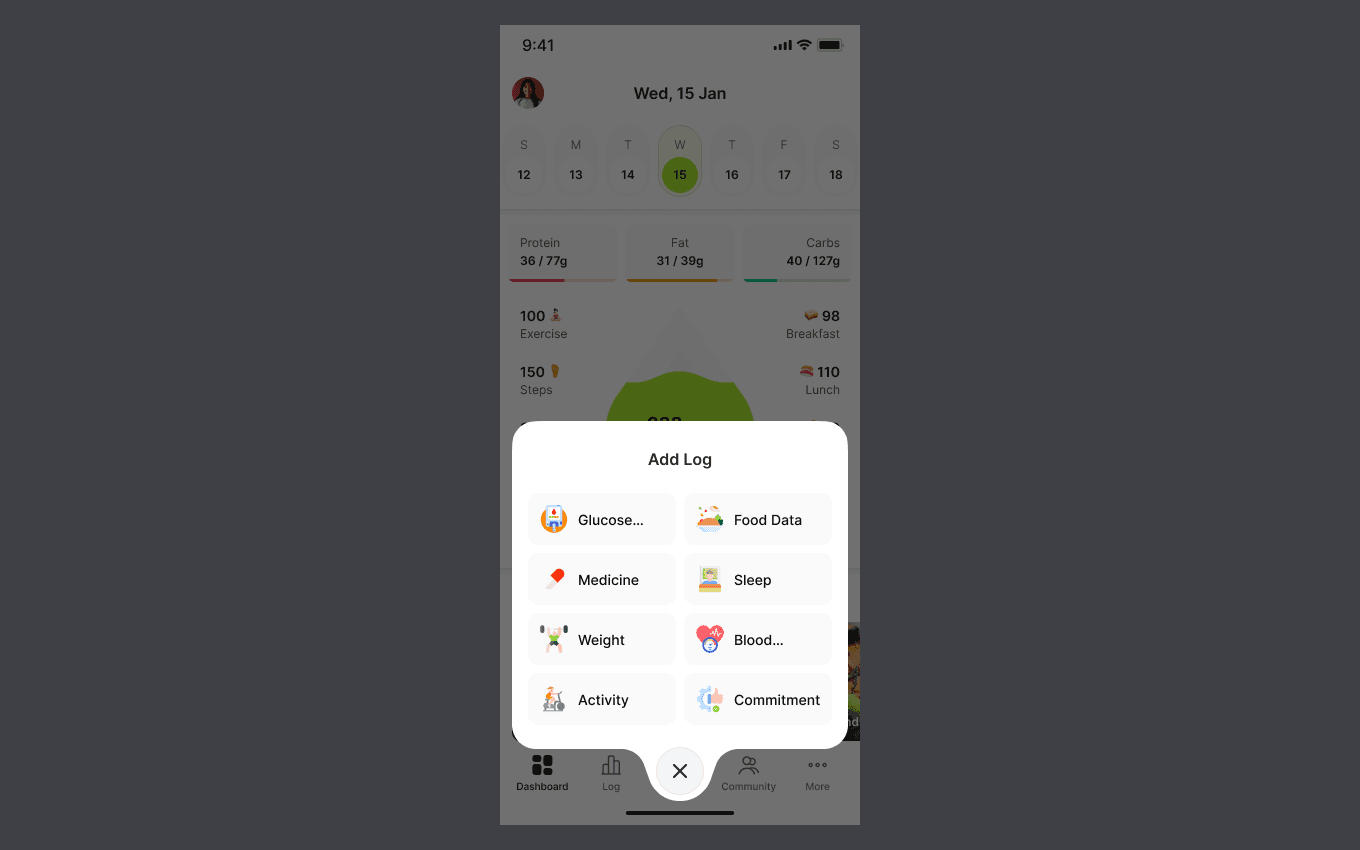
Navigation is present, but not dominant. The bottom navigation bar provides clear access to core areas like dashboard, logging, community, and additional features without pulling attention away from the current state. The primary action sits centrally, reinforcing the idea that input is intentional, not constant.
This structure ensures:
- Fast access to key areas
- Minimal accidental taps
- Clear mental separation between viewing and logging
The home screen remains a place to understand, not to configure endlessly.
Daily Advice as Gentle Guidance 💡
Below the metrics, the “My Daily Advice” section introduces a softer layer of support. Rather than prescriptions or alerts, this area highlights small, actionable suggestions—food ideas, habits, or trends. This content is designed to:
- Feel encouraging rather than corrective
- Change daily to maintain freshness
- Connect metrics with practical actions
Over time, this section will become more personalized, but even in its first form, it adds warmth and context to raw numbers.
Designed for Real Life, Not Ideal Days 🌤️
One of the core principles behind this blueprint is acknowledging imperfection. Some days will have missing data. Some days will be off-plan. The design does not punish that. The home screen still works even when:
- Only meals are logged
- Activity is skipped
- Metrics are incomplete
This flexibility is intentional. Diablyst is being designed for sustainability, not streaks.
How This Fits Into the Larger Diablyst Vision 🔗
The mobile home screen is where everything converges—content, community, guidance, and self-care tools. As the platform evolves, this screen will:
- Pull insights from blog and education content
- Surface relevant community discussions
- Adapt based on personal patterns
- Act as a calm anchor across the product
What Comes Next 🚀
This blueprint is the starting point, not the finish line. The next steps involve validating assumptions, refining interactions, and connecting this screen to deeper flows like detailed logs, insights, and recommendations. Future iterations will focus on:
- Personalization logic
- Accessibility and readability
- Long-term engagement patterns
- Integration with community and knowledge layers
Each change will build on this foundation rather than replace it.